Ontario Digital Club
Your browser does not support the audio element.
we are a group of electronic enthusiasts in Ontario, Canada.
active on all digital modes
Setting up a D-Star radio for a duplex repeater. Example: VE3XII-B (UHF)
Set the channel for DR mode (ICOM DV mode?)
Enter the repeater frequency { 446.125 }
Enter the offset amount { 5.000 }
Enter the offset direction +/- { negative }
note that B and G are always in position 8 regardless of the callsign length
URCALL = CQCQCQRPT1: VE3XII BRPT2: VE3XII Gpos : 12345678
Setting up a D-Star radio for a simplex repeater. Example: VA3UV-C (VHF)
Set the channel for DR mode (ICOM DV mode?)
Enter the repeater frequency { 147.540 }
Enter the offset amount { 0.000 }
Enter the offset direction +/- { negative/positive doesn't matter as long as it's in-band }
note that C and G are always in position 8 regardless of the callsign length
URCALL = CQCQCQRPT1: VA3UV CRPT2: VA3UV Gpos : 12345678
Kenwood TH-D74/75 Duplex repeater setup
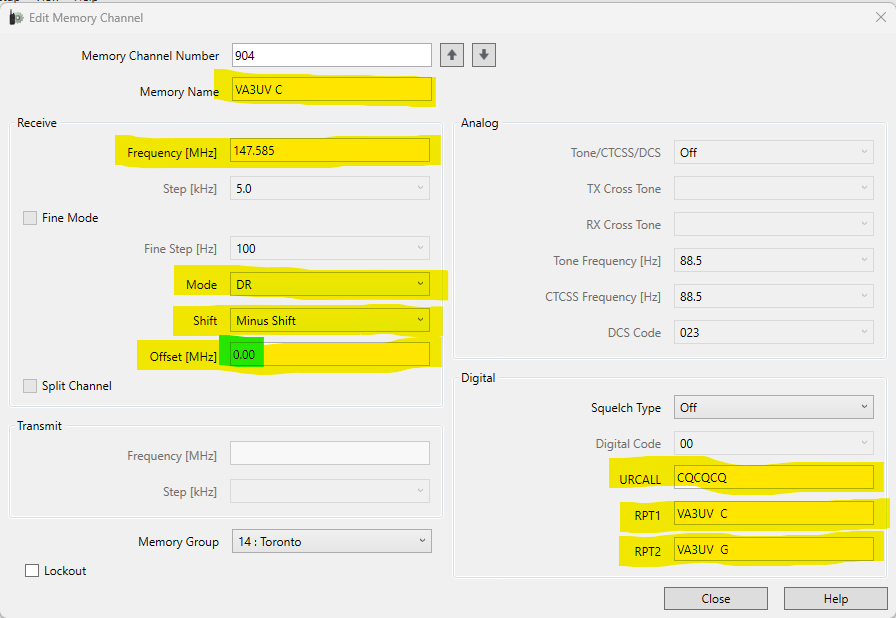
Kenwood TH-D74/75 Simplex repeater setup
Notice it is set to a negative shift and an offset of 0.00 This is very important!
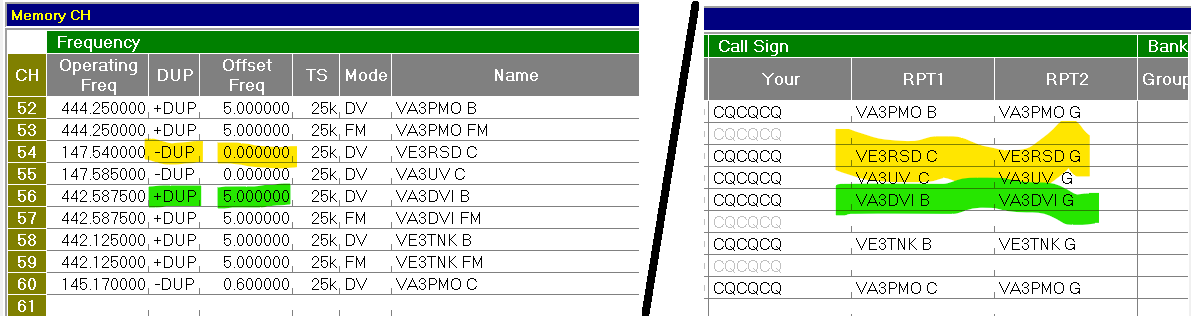
ICOM radio programming example
Notice that simplex repeaters require a negative (or positive) shift and an offset of 0.00 - this is very important!
To help you get started, we have provided a sample csv file. This file can be easily imported using the ICOM programming software (CS-4100 and CS-5100 for sure, possibly other programming software too!).
Click here to download ICOM .csv sample file
ODC
Ontario Digital Club
location
Ontario, Canada
contact
currently XLX405D


 -
-